How to Hide Speaker Wires for Surround Sound Without Cutting Drywall in Houston, TX
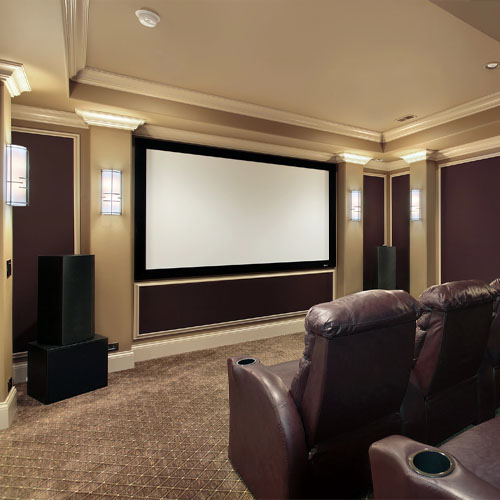
Want cinema-quality sound without seeing a tangle of cables? Here’s how Houston homeowners can hide speaker wires for surround sound without cutting drywall. If you want a neat, code‑appropriate finish and reliable performance, partner with the pros at Hargrett Electronics L.L.C. for surround sound installation that keeps your walls intact and your room sleek.
Exploring the best ways to hide speaker wires without cutting drywall in Houston, TX starts with matching the method to your room, your gear, and the paths your home already gives you.
Why Invisible Wiring Matters in Houston Homes
Open‑concept floor plans are everywhere in neighborhoods like The Heights, Katy, and Sugar Land. That makes wire paths more visible and tripping hazards more likely. Clean cable management protects your equipment, keeps walkways clear, and preserves your design choices without bulky conduits.
Moist Gulf air, attic heat, and frequent A/C cycles can also affect how and where cables should run. Thoughtful routing helps protect signal quality and reduces future maintenance.
No‑Cut, Pro Options That Keep Walls Intact
Surface Raceways That Disappear After Paint
Low‑profile raceways sit on the wall surface or along trim lines, then get color‑matched to the wall. The result looks tidy and blends in, especially when routed along baseboards or crown lines where shadows already fall.
Baseboard and Quarter‑Round Channels
Upgrading to baseboards with integrated cable channels, or adding paintable quarter‑round, creates a discreet path around the room. This is popular in River Oaks and Memorial where finishes matter and homeowners want a seamless look.
Attic or Crawlspace Drops With Minimal Openings
Pros can route cables through attics or crawlspaces and exit behind furniture or near baseboards. This approach limits openings to small, covered points and avoids wide drywall cuts while keeping cables protected out of sight.
Built‑Ins and Furniture Integration
Media consoles, bookcases, and custom millwork provide hidden routes from the receiver to surrounds. This is a smart fit for townhomes around Midtown and the Galleria where wall access is tight and storage is at a premium.
Smart Wireless Add‑Ons Where It Makes Sense
Wireless rear speaker kits or systems reduce long cable runs across rooms. You still need nearby power for each speaker, and placement must account for Wi‑Fi congestion in dense areas, but it’s a strong pick when you cannot open walls.
Match The Method To Your Room Type
Open‑Concept Living Rooms
For long, shared spaces in The Heights or Cinco Ranch, ceiling lines and trim transitions become natural cable paths. Pros often pair raceways with strategic speaker placement to keep sightlines clean and traffic flow safe.
Townhomes and Condos
In Midtown or near The Galleria, shared walls and HOA rules can limit invasive work. Surface solutions, furniture integration, and selective wireless components keep everything clean while respecting building guidelines.
Older Bungalows and Remodels
Historic homes in Montrose or the East End benefit from noninvasive routing that protects original plaster and trim. Baseboard channels and attic drops with minimal openings preserve character while delivering modern sound.
What Pros Evaluate Before They Start
- Where your AVR and subwoofer live, and how cables fan out from that hub
- Existing trim profiles, floor transitions, and furniture paths that can hide runs
- Power access for surrounds if using wireless or powered components
- Nearby HVAC, plumbing, and electrical that could interfere with routing
They also consider how your family uses the room. High‑traffic areas, kids’ play zones, and pet paths all affect where cables should never go.
Clean, Safe, and Reliable: How Pros Get It Right
Professional routing looks good on day one and keeps working year after year. The right materials and techniques prevent loose connections, abrasion, and accidental tugs that can damage gear or mar finishes.
- Use purpose‑built, in‑wall rated cable where it enters cavities to protect jackets and maintain signal quality.
- Avoid running alongside high‑voltage lines for long distances to reduce the chance of noise.
- Plan gentle bends and secure strain relief so connectors do not loosen over time.
- Label both ends of every run to make future upgrades quick and error‑free.
When Fewer Wires Make Better Sense
Some rooms perform best with a hybrid approach. A quality front soundstage with a compact sub, plus wireless or short‑run surrounds, can deliver the experience you want without complex routing. Calibration fine‑tunes delay, level, and crossover so the system sounds cohesive even when wire paths are unconventional.
Open‑Concept Acoustics Without Wall Cuts
Large rooms in Katy or The Woodlands can swallow dialog and effects. Pros solve this with precise speaker angles, careful sub placement, and discreet cable runs that let you upgrade to advanced formats later. If you want immersive audio without clutter, explore our surround sound systems page to see clean‑finish options that fit modern Houston layouts.
Cable Management That Complements Design
Surface solutions are only successful when they blend into the space. Color‑matched raceways, aligned seam lines, and tidy terminations at the equipment rack keep the aesthetic high. Your guests should notice the sound, not the cables.
Timeline and Home Readiness
Project timing varies by home size, materials, and season. Many homeowners schedule work around other updates like paint or flooring so trim lines and cable covers can be finished together. The result is one smooth transformation instead of a series of small disruptions.
Future‑Proofing Your Setup
Even if you only need 5.1 today, planning paths for additional speakers and sub lines helps you grow to 7.1 or immersive formats later. Labeling, slack management, and accessible terminations make upgrades faster, cleaner, and less disruptive.
How Hargrett Electronics L.L.C. Helps Houston Homes Look And Sound Better
Our team designs wire paths that respect your layout, your finishes, and your family’s routine. We coordinate around trim, furniture, and power access so your system looks built‑in, not added on. If you enjoy whole‑home listening, we can tie your theater to the rest of your audio with whole‑home audio that keeps wires hidden from room to room.
Ready For A Clean, No‑Cut Surround Sound Upgrade?
Get a plan that fits your space and protects your finishes. Explore clean‑finish options on our surround sound systems page, then call 346-299-2010 to schedule your visit. If your TV placement is changing too, we can align the wire plan with secure, sleek TV mounting so everything looks intentional from day one.
Houston rooms deserve immersive sound without the clutter. With Hargrett Electronics L.L.C., you get a thoughtful design, careful routing, and a finish that looks as good as it sounds.
Get Started on Your Dream Home Theater in Houston! Contact Us Today For A Free Quote