The Top 5 Design Mistakes Homeowners Make When Building a Media Room in Houston, TX
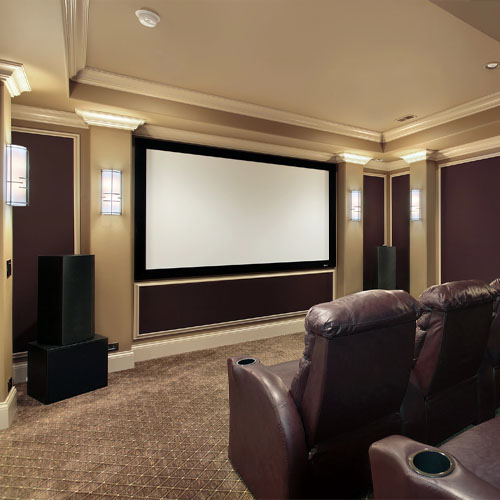
Planning a media room should be exciting, not stressful. Yet many projects stall because of common media room design mistakes in Houston that are easy to prevent with the right plan. If you want a space that looks amazing and performs every night, partner with a local pro who can guide the design from the first sketch. A well-planned room paired with expert home theater design is the difference between an okay setup and a space your family never wants to leave.
Avoid Media Room Design Mistakes Houston Homeowners Regret
Houston homes vary a lot, from classic bungalows in The Heights and Montrose to modern builds in Memorial, West U, and Sugar Land. Open floor plans, tall ceilings, and big windows look great, but they can create glare, echo, and sound bleed. The sections below show the most common missteps we see across the city and how smart planning prevents them.
Mistake #1: Ignoring Room Shape, Sightlines, and Screen Size
A beautiful room still falls flat if people cannot see the screen comfortably. Long, narrow rooms or spaces with odd alcoves can push seats too far to the sides, which hurts sightlines and makes the picture feel dim. Picking a screen that is too large or too small for your seating distance also strains eyes and ruins the cinematic feel.
Think about where you want your front row, how high the screen will sit on the wall, and how many rows the room can truly support. Riser heights, seat widths, and walkway clearances all influence whether everyone gets a great view. Choose the right screen size for your seating distance so action scenes look crisp and subtitles stay legible without squinting.
- Place seats so viewers face the center of the screen, not angled toward a corner.
- Keep aisles wide enough for easy movement without blocking views.
- Plan screen height so the center sits near seated eye level to reduce neck strain.
Mistake #2: Overlooking Acoustics and Sound Isolation
High-performance audio is about more than premium speakers. In many Houston homes, wood or tile floors, drywall, and large windows bounce sound around the room. That echo hides dialogue and makes bass boomy. In two-story homes, sound can leak upstairs through cavities, doorways, and HVAC returns, which frustrates anyone trying to sleep.
Before you choose gear, focus on the room. Acoustic panels, bass management, door seals, and proper speaker placement reduce reflections and keep sound from spilling into the rest of the house. Treat first reflections before boosting the volume and you will hear instant improvements in clarity at normal listening levels.
For ideas that fit real homes, browse practical home theater tips that explain how room materials and layout affect what you hear.
- Use soft finishes where possible to tame echo while keeping your preferred style.
- Choose doors and seals that limit sound crossing into hallways and bedrooms.
- Work with a pro to place subwoofers so bass feels even across all seats.
Mistake #3: Underestimating Power, Ventilation, and Heat
Electronics create heat, and Houston summers add to the load. Racks packed into tight closets without airflow will shorten equipment life and can cause random shutdowns during big games or movie night. Power quality matters too. Frequent afternoon storms and grid spikes can stress delicate components.
Plan for dedicated circuits, safe cable management, and active ventilation in any enclosed cabinet or closet. A quiet cooling solution keeps amplifiers, receivers, and streaming gear in their comfort zone so your system stays reliable when the house is full of guests.
Houston’s storm season can bring sudden power surges. A pro-grade surge and power management solution helps protect your investment and prevents nuisance resets after flickers.
Plan for power and ventilation before you close the walls so your gear runs cool and quiet year-round.
Mistake #4: Bad Lighting and Glare Control
Great picture quality depends on controlled light. Large windows in River Oaks or Bellaire are stunning, but untreated glass washes out contrast and reveals every reflection on the screen. Ceiling cans placed over the first row create hot spots and eye strain. Even stylish wall sconces can ruin black levels if they are too bright or too close to the screen.
Choose layered lighting that can dim in zones, with fixtures placed behind or to the sides of seating. Use shades or drapery with opaque liners where needed. Media rooms in bright homes often benefit from light-absorbing paint on the front wall and darker finishes near the screen. The goal is simple: no visible bulbs, no glare, and smooth control from your seat.
Mistake #5: Incomplete Wiring and Future-Proofing
Wireless is convenient, but a reliable media room still relies on solid wiring. Many homeowners run just enough cable for today and then face holes in drywall a year later because they want a gaming console, a new projector, or a second subwoofer. Conduit paths, network runs, and flexible speaker wire routes let your room adapt as tech changes.
Think about streaming habits, gaming, and how family or guests will connect. Service loops, labeled cables, and accessible rack space make upgrades faster with less disruption to your home.
- Include fiber-capable HDMI, Ethernet, and control wiring where practical.
- Leave accessible conduit to key locations, such as the projector and front wall.
- Ensure rack space and shelves can handle future components and clean cable dressing.
Room-By-Room Considerations for Houston Homes
Different spaces call for different decisions. A spare bedroom in Montrose might be ideal for a small, quiet theater with excellent sound isolation. A large game room in Katy or Cypress might need extra bass management and blackout treatments to overcome open layouts and windows. In townhomes and patio homes, ceiling height can limit projector choices, which shifts the plan toward a premium TV and careful seating layout.
Garages converted to media rooms must account for heat and humidity, plus detached runs for power and networking. Basements are rare in our area, so most projects are on slabs. That makes pre-wire planning even more important before floors and walls are finished.
Display Choices That Fit Houston Lifestyles
Projectors create a cinematic feel and work best when light is under control. In brighter rooms, premium TVs maintain contrast during daytime viewing and big game parties with the windows open. Consider how your family watches: movies at night, sports on weekends, or kids’ shows in the afternoon. Match the display to your real habits, not just the spec sheet.
For many households, a flat-panel with well-placed acoustic treatments and a controlled lighting plan beats a compromised projector setup. Others will still love a projector in a properly darkened space with seating distances tuned to screen size.
Audio That Balances Dialogue and Impact
Clear dialogue wins every time. That means careful center channel placement and seating lines that keep your ears on axis with the speakers. Subwoofers should feel tight and even, not overbearing. In open Houston floor plans, dual subs can reduce peaks and valleys and deliver consistent bass to all seats.
Do not chase volume to fix clarity. If you cannot hear whispers or fast talk, the room needs treatment and calibration, not just bigger gear.
Smart Control and Daily Usability
The best media rooms are simple to use. One button should set lights, turn on components, and select your go-to sources. If your family or guests need a printed guide to watch a movie, the system is too complex. Voice assistants and streamlined remotes make daily use painless while keeping settings locked so nothing drifts out of calibration.
Tie It All Together With Expert Planning
A media room is a system. Room shape, seats, screen, speakers, wiring, control, power, and cooling all interact. Skipping any one piece creates problems you will notice later. That is why working with a specialist early saves time and frustration. When you combine design decisions with local experience, you avoid the media room design mistakes in Houston that derail projects.
Why Work With Hargrett Electronics L.L.C.?
Hargrett Electronics L.L.C. designs and builds media rooms across the Houston area, from West University to Sugar Land, with a focus on performance and reliability. We listen first, model the room, and map the experience from the main seat out to every row. Then we coordinate with your builder or designer, manage wiring and ventilation, and calibrate audio and video so the room feels effortless.
If you are starting fresh or renovating an existing space, our team can integrate acoustics, lighting control, and seating into a cohesive plan. That means fewer surprises during construction and a finished room that works for movie nights, game days, and quiet streaming sessions alike.
Your Next Step
Ready to turn your plans into a finished space? Schedule a design consult with Hargrett Electronics L.L.C. and see how a tailored layout, acoustic plan, and wiring map will elevate your project. When you are set to move forward, our team delivers start-to-finish home theater installation that brings your vision to life in Houston.
Houston homeowners get the best results when they plan early. Call us at 346-299-2010 to talk through your room, or book a visit so we can walk the space and outline your options. You will avoid costly changes, protect your gear, and enjoy a room that performs beautifully every day.
Get Started on Your Dream Home Theater in Houston! Contact Us Today For A Free Quote